This looks more like a user fail. Push enter and a scroll bar appears allowing more lines, and the user to scroll through the lines. Trying to understand why this is hard to use....
Right. Except that it didn't. I didn't say that it was hard to use. Good UI isn't so much about being easy as being obvious. You're just being contrary.
As I already said this is 100% user fail. If you don't understand entering one number then pushing enter and the scroll bar appears, and moving the scroll bar up and down scrolls through any numbers you enter, you have other more serious problems. Here is a picture for the mentally challenged: http://img22.imageshack.us/img22/1499/upsk.jpg (The blue bar at the left of the box is a scroll bar, moving it up and down will display entries that do not fit in the box)
I can only assume that you're the programmer that "designed" this feature. I'm sorry if it hurts your feelings that it's not immediately evident to all your users what it's supposed to do. The first thing that you are supposed to learn in user interface design is that the user is right, not you. Sorry.
I'm not the programmer, but I do have a enough common sense to to be able to enter information into a box. Scroll bars have been used to expand windows that are too small to display the information contained since MS-DOS. For something that has been used for so long and in several different OS's you must really have a difficult time finding a computer you're able to use.
Perhaps you could read what I'm saying, rather than merely being contrary. I did that, and it didn't behave that way. It simply didn't. You can insult me all you like, but the facts are not on your side.
The only person misrepresenting the facts is you. First off your picture isn't even a picture from UPS web site. The box on ups.com has enough room for 5-6 lines of information, then scroll bars appear (on the right, I did make a mistake of saying on the left) Are you suggesting they should have enough room for 25 lines? Why? Most people using it are going to enter one, maybe 2 at a time. Even then its fairly obvious for anyone that has used a computer of how to enter information into a box, and if the window isn't large enough and a scroll bar is there they can move the scroll bar to reveal more information.
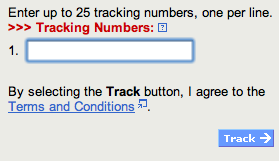
This conversation is getting progressively more pointless. I took the screen capture from the UPS website. I have no motivation to falsify a screen capture. I simply can't imagine why you're getting so passionate about this. There wasn't a scroll bar. There was one line, labelled "1." Please see the screen capture.
This looks more like a user fail. Push enter and a scroll bar appears allowing more lines, and the user to scroll through the lines. Trying to understand why this is hard to use....
Right. Except that it didn't. I didn't say that it was hard to use. Good UI isn't so much about being easy as being obvious. You're just being contrary.
As I already said this is 100% user fail. If you don't understand entering one number then pushing enter and the scroll bar appears, and moving the scroll bar up and down scrolls through any numbers you enter, you have other more serious problems. Here is a picture for the mentally challenged: http://img22.imageshack.us/img22/1499/upsk.jpg (The blue bar at the left of the box is a scroll bar, moving it up and down will display entries that do not fit in the box)
I can only assume that you're the programmer that "designed" this feature. I'm sorry if it hurts your feelings that it's not immediately evident to all your users what it's supposed to do. The first thing that you are supposed to learn in user interface design is that the user is right, not you. Sorry.
I'm not the programmer, but I do have a enough common sense to to be able to enter information into a box. Scroll bars have been used to expand windows that are too small to display the information contained since MS-DOS. For something that has been used for so long and in several different OS's you must really have a difficult time finding a computer you're able to use.
Perhaps you could read what I'm saying, rather than merely being contrary. I did that, and it didn't behave that way. It simply didn't. You can insult me all you like, but the facts are not on your side.
The only person misrepresenting the facts is you. First off your picture isn't even a picture from UPS web site. The box on ups.com has enough room for 5-6 lines of information, then scroll bars appear (on the right, I did make a mistake of saying on the left) Are you suggesting they should have enough room for 25 lines? Why? Most people using it are going to enter one, maybe 2 at a time. Even then its fairly obvious for anyone that has used a computer of how to enter information into a box, and if the window isn't large enough and a scroll bar is there they can move the scroll bar to reveal more information.
This conversation is getting progressively more pointless. I took the screen capture from the UPS website. I have no motivation to falsify a screen capture. I simply can't imagine why you're getting so passionate about this. There wasn't a scroll bar. There was one line, labelled "1." Please see the screen capture.